

Use your JCU login and password to download EndNote for free using the JCU license. You should use the latest version if possible
If you have problems logging into the download site try using another browser or clear your browser cookies, cache and history.
Ignore this screen, don't close it:

Then search for EndNote in your Start menu and click on the EndNote App:

Then follow the prompts to complete the program set-up. You may me immediately prompted to update to a newer version - this is normal as EndNote frequently updates. Just download the newer version and continue.
When you open Word for the first time after installing EndNote, you may see a dialogue box saying EndNote wishes to be able to make changes to Word. Accept this.
If you get an error message saying:
EndNote21.exe is dangerous, so Chrome has blocked it.
In Chrome, click on the three dots (top right), then Downloads then Keep dangerous file
EndNote should not ask for a product key if it is installed correctly using the download link on this page.
If this does not solve the problem it is likely that the software has not been installed completely or correctly. This is more likely to occur for Windows machines.
If you get the same problem, contact us and tell us if you are on a personal PC or a JCU work computer, which version of Windows you are using and whether you get any messages as part of the process (take screenshots, if you can).
JCU staff wishing to install EndNote on their work machines can do so using the link above or the Software Center. Before installing software onto a JCU staff machine, you will need to make yourself Admin for that machine. You can get Make Me Admin instructions from the IT Knowledge Base in Service Now.
Windows: In the search bar, type "Make Me Admin". Click on the Make Me Admin app and follow the prompts (If the app doesn't come up for a search, go to: C: > Program Files > Make Me Admin > MakeMeAdminUI.exe > Grant Me Administrator Rights)

Mac: In the topmost section of your screen, look for the JCU icon and click on it. You will see the option of Make me Admin.

When installing EndNote onto WIndows 10 or 11 machines, you may get an error stating 'For security and performance this mode of Windows only runs verified apps from the Store'. This indicates that the computer is currently running in S mode.
To install EndNote you need to switch out of S mode. To do this:
Open Settings > System > Activation.
In the Switch to Windows 11 Pro section, select Go to the Store. (If you also see an "Upgrade your edition of Windows" section, be careful not to click the "Go to the Store" link that appears there.)
On the Switch out of S mode (or similar) page that appears in the Microsoft Store, select the Get button. After you see a confirmation message on the page, you'll be able to install apps from outside of the Microsoft Store.
Notes:
Go to your EndNote application folder and double click on Configure EndNote.exe. This is usually located at:
This PC > C: > Program Files (x86) > EndNote 21 > Configure EndNote.exe
If you get the following message:
“EndNote21.pkg” can’t be opened because Apple cannot check it for malicious software.
This software needs to be updated. Contact the developer for more information.
Click OK to close the message
Another potential fix involves finding the EndNote21.pkg file in your downloads, then:
Your add-in isn't compatible with this version of Word
|
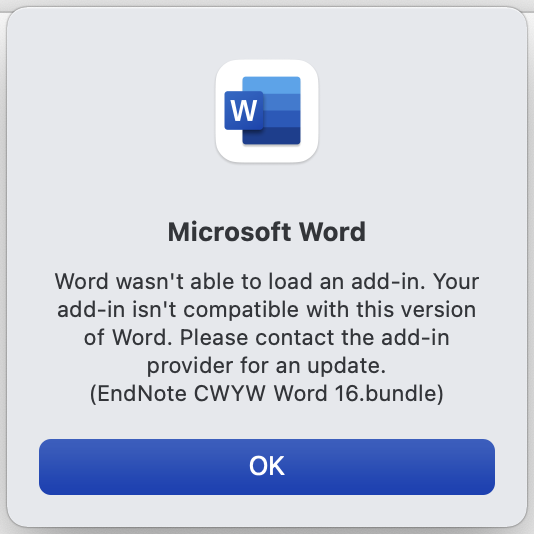 |
If you have installed EndNote on your Mac but the EndNote tab is not showing in Word:
Make sure you Quit Word (Command+Q) before attempting to install the Cite While You Write add-in.

NB: EndNote 21 has only a few changes from EndNote20, so most of these tutorials are suitable for EndNote21 as well.
Before you start...
If you are using your own computer, make sure you have the latest versions of Word and EndNote installed. JCU computers will already have them installed.
 Some videos and instructions within this guide are for older versions of the software. There may be some differences in the way some parts of the product appear, such as buttons looking different but the functions have not changed.
Windows
The following video playlist contains 19 videos covering EndNote essentials for Windows. Click on the hamburger menu in the top left corner to see the list of all available videos in the series.
Mac
Note that the first method of reference capture searching through the EndNote program (from minutes 1:30 to 3:09) does not work for most JCU databases and is not recommended to use.
We acknowledge the Australian Aboriginal and Torres Strait Islander peoples as the first inhabitants of the nation and acknowledge Traditional Owners of the lands where our staff and students, live, learn and work.

This work is licensed under a Creative Commons Attribution-ShareAlike (CC BY-SA) 4.0 International License, unless otherwise noted. Content from this Guide should be attributed to James Cook University Library. This does not apply to images, third party material (seek permission from the original owner) or any logos or insignia belonging to JCU or other bodies, which remain All Rights Reserved.
